
8K PBR Materials for AI Film Assets: Advanced Shading
A Professional Guide to Resolving Artifacts and Achieving Precise Rendering in Cinematic Pipelines
The rapid adoption of any AI 3D Model Generator within high-end visual effects and media production pipelines has exposed a critical technical bottleneck: micro-surface geometric anomalies. cite: 1 When raw, generated meshes interact with complex cinematic lighting engines, minor topological inconsistencies often manifest as severe shading artifacts that break immersion. cite: 2 Resolving this friction requires moving beyond basic maps and implementing a strict 8K Physically Based Rendering (PBR) workflow. cite: 3 By properly calibrating ultra-high-resolution materials to algorithmic geometry, studios guarantee advanced light interaction and maintain the suspension of disbelief required in modern film production. cite: 4
Key Insights
- 8K resolution serves as the non-negotiable baseline for VFX in 2026, preventing pixelation during extreme close-up shots on large-format displays. cite: 5
- Differentiating between structural topological pinching and surface-level texture distortion is the foundational step in diagnosing cinematic shading failures. cite: 6
- Standardized naming conventions and rigorous UV management, specifically utilizing UDIM workflows, are mandatory for scaling assets across studio pipelines. cite: 7
- Precision calibration of normal maps and roughness anti-aliasing eliminates specular swimming and aliasing under dynamic, path-traced lighting conditions. cite: 8
The Challenge of Shading AI-Generated Film Assets
AI-generated 3D topology can sometimes introduce micro-surface irregularities that cause shading artifacts in high-end renderers. cite: 9 Implementing a strict 8K PBR (Physically Based Rendering) workflow resolves these specular and diffuse distortions, ensuring assets meet the rigorous visual standards of modern cinematic production. cite: 10
Identifying Topology vs. Texture Distortions
The 3D creation pipeline is evolving rapidly across the industry. cite: 10 Newer, integrated platforms are emerging that combine AI-assisted generation, optimization, and rendering into cohesive workflows. cite: 11 These tools can take a text or image input and generate production-ready 3D assets with optimized topology and basic materials, effectively compressing the traditional early-stage workflow. cite: 12 This allows artists to begin projects closer to the lighting and rendering stage, focusing creative energy on high-value artistic decisions rather than manual technical construction. cite: 13 However, despite these advancements, distinguishing between topological artifacts and texture distortions remains a critical diagnostic skill for technical directors. cite: 14 Topological distortions occur when the underlying mesh contains non-manifold geometry, heavily pinched vertices, or unresolved n-gons. cite: 15 In a path-traced environment, these structural flaws cause rendering engines to miscalculate bounce lighting, resulting in harsh, angular shadows that ignore the intended direction of the primary light source. cite: 16 These issues are baked into the physical structure of the model and cannot be masked by basic texturing. cite: 17 Texture distortions, conversely, present as stretched pixels, blurred micro-details, or swimming specular highlights. cite: 18 These anomalies are caused by inadequate map resolution, improper UV projection, or incorrect color space configurations within the shader graph. cite: 19 Diagnosing the root cause dictates the corrective action: structural remeshing is required for topology issues, whereas refining the material mapping and increasing texel density resolves texture anomalies. cite: 20 Understanding this distinction prevents artists from wasting hours attempting to fix a structural geometry issue through surface-level texture adjustments. cite: 21
Why 8K Resolution is the Baseline for 2026 VFX
In the context of modern film production, audience expectations and rendering hardware capabilities have established 8K resolution as the absolute minimum standard for hero assets. cite: 22 A 4K map stretched across a massive cinematic asset simply lacks the texel density required to maintain visual fidelity during dynamic camera movements, particularly when utilizing extreme focal lengths or rendering for IMAX projection formats. cite: 23 The mathematics of modern rendering demand high data density to calculate accurate light scattering. cite: 24 Utilizing 8K maps provides the necessary pixel density for micro-details—such as subtle scratches, microscopic pores, or intricate material wear—to interact convincingly with complex lighting setups. cite: 25 This high-resolution standard ensures that the physical properties of the material behave predictably across the entire Bidirectional Reflectance Distribution Function (BRDF). cite: 26 When a hero asset occupies the majority of the screen space, the difference between 4K and 8K dictates whether the specular reflections appear as mathematically precise light bounces or as a grid of blurred, unconvincing pixels. cite: 27 Furthermore, 8K resolution provides compositors with the necessary latitude to apply aggressive color grading operations without introducing banding or artifacting into the asset's surface data. cite: 28
Workflow: Generating 8K PBR Materials for Tripo AI Models
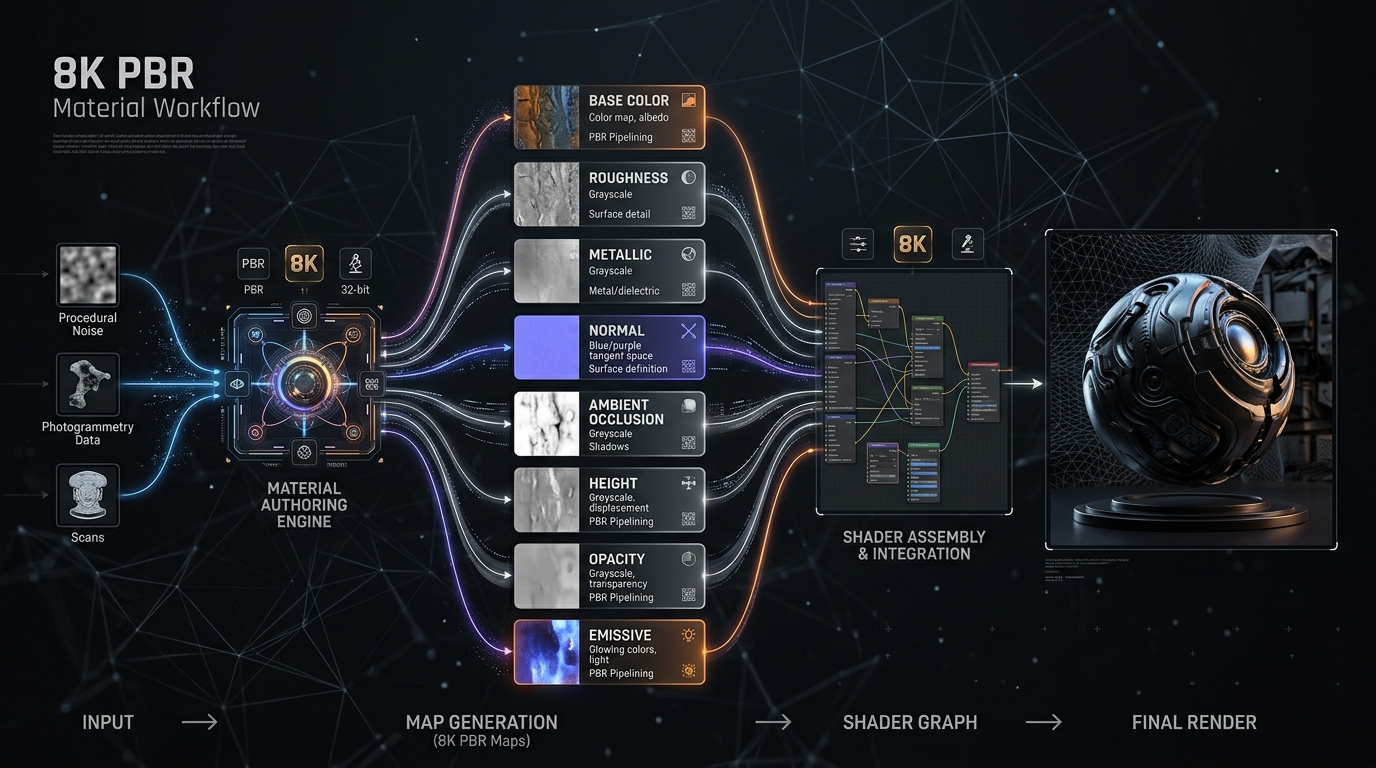
To achieve distortion-free shading, artists must establish a precise pipeline: exporting the base mesh from Tripo AI, optimizing UV layouts, and generating ultra-high-resolution 8K PBR maps (Albedo, Normal, Roughness, Metalness) to dictate accurate, realistic light interaction across the 3D asset.
Exporting Base Assets (USD, FBX, OBJ, GLB, 3MF, STL)
The material pipeline strictly begins with extracting the generated mesh while preserving its critical spatial and structural data. cite: 29 When preparing assets from Tripo AI for texturing, selecting the correct file type is paramount for downstream software compatibility. cite: 30 Industry-standard export formats include USD, FBX, OBJ, STL, GLB, and 3MF. cite: 31 For cinematic workflows, USD (Universal Scene Description) and FBX are heavily favored. cite: 32 The USD format excels in collaborative studio environments due to its non-destructive layering system and robust handling of complex hierarchical data, materials, and variants. cite: 33 FBX remains a staple for legacy pipeline stability, effectively preserving smoothing groups and accurate vertex normals. cite: 34 While GLB, OBJ, STL, and 3MF serve specific purposes in rapid prototyping, web deployment, or additive manufacturing, they often lack the robust metadata encapsulation and smooth group preservation required by high-end compositing and texturing software like Mari or Substance 3D Painter. cite: 35
UV Unwrapping Strategies for AI Geometries
Before ultra-high-resolution maps can be applied, the asset requires a meticulous, mathematically sound UV layout. cite: 36 Automated geometry often benefits from manual or semi-automated UV repacking to eliminate overlapping islands, minimize stretching, and hide texture seams in areas of low visibility. cite: 37 Standard automated unwrapping algorithms prioritize speed over logical seam placement, which can cause visible breaks in complex 8K textures. cite: 38 For hero assets in a film pipeline, implementing a UDIM workflow is essential. cite: 39 Distributing the UV islands across multiple 1001+ coordinate tiles allows the 8K resolution to be allocated specifically to high-visibility areas, maintaining a consistent, mathematically optimal texel density across the entire model. cite: 40 This approach ensures that a continuous texture applied over a massive surface does not suffer from localized pixelation. cite: 41 By utilizing UDIMs, artists bypass the hard limits of single-tile texture resolution, effectively multiplying the available pixel data and allowing rendering engines to stream high-resolution textures efficiently based on camera proximity. cite: 42
Upscaling and Baking 8K Texture Maps
Once the UV layout is optimized, the focus shifts to advanced material generation. cite: 43 Post-generation, it is critical to refine AI-created textures by meticulously adjusting overall scale, color balance, and surface detail. cite: 44 When utilizing AI texturing systems to generate base layers, artists should employ advanced layer blending techniques, combining multiple generated textures to create highly complex, nuanced materials. cite: 45 For example, blending a procedurally generated underlying rust layer with an AI-generated brushed metal surface creates a physically accurate representation of oxidized degradation. cite: 46 Establishing a rigorous naming convention is vital for pipeline organization and shader assignment. cite: 47 Studios must utilize prefix categories (e.g., METAL_, WOOD_, FABRIC_) and include the specific finish type in the nomenclature (e.g., METAL_BRUSHED, METAL_RUSTED). cite: 48 This prevents misallocation within massive asset libraries. Furthermore, verified PBR values should be stored directly with the material metadata, ensuring consistent resolution and lighting behavior across the entire production. cite: 49 Finally, artists must always inspect these high-resolution maps on the actual model under varying, HDR-driven lighting conditions. cite: 50 Checking the asset under extreme high-contrast lighting, diffuse overcast setups, and sharp rim lighting is the only reliable method to identify and correct any residual stretching, resolution anomalies, or unexpected specular behavior before the asset is approved for final rendering. cite: 51
Eliminating Distortion in Cinematic Shaders
Optimizing the final look requires exact shader configuration in your target DCC or rendering engine. cite: 52 By properly calibrating 8K PBR maps to the AI-generated geometry, texture swimming, normal map skewing, and specular aliasing are completely eliminated under complex cinematic lighting conditions. cite: 53
Proper Normal Map Calibration (DirectX vs. OpenGL)
A frequent, yet easily preventable, point of failure in cinematic shading involves the incorrect interpretation of tangent-space normal maps. cite: 54 Rendering engines strictly adhere to either DirectX (Y-) or OpenGL (Y+) mathematical standards for calculating surface angles. cite: 55 Applying an OpenGL normal map in a DirectX-based engine inverts the green channel of the texture. cite: 56 This inversion causes the lighting calculations to render physical concavities as convexities, and vice versa. cite: 57 The result is severe shading distortion that entirely compromises the 8K fidelity of the asset, making the geometry appear broken or inside-out under directional lighting. cite: 58 Artists must verify the specific standard of their target rendering engine (such as Arnold, V-Ray, or RenderMan) and, if necessary, invert the green channel within the shader graph or compositing node tree to ensure that the micro-surface geometry catches light accurately. cite: 59 Proper calibration ensures that the high-frequency details of the 8K normal map translate accurately into realistic surface depth. cite: 60
Managing Roughness and Specular Anti-Aliasing
Even with high-quality 8K maps and accurate normal calibration, sub-pixel rendering artifacts can occur when high-frequency roughness details are viewed from a distance or at oblique camera angles. cite: 61 This phenomenon, known as specular aliasing, manifests as a distracting, flickering, or swimming effect on the asset's surface during camera movement. cite: 62 It occurs because the rendering engine struggles to sample the immense data density of an 8K map into a small cluster of screen pixels. cite: 63 To mitigate this, modern rendering engines utilize advanced specular anti-aliasing techniques. cite: 64 This often involves the generation of specialized mipmaps that smoothly filter the roughness map based on the camera's distance and the curvature of the geometry. cite: 65 By properly configuring these filtering parameters and ensuring the 8K roughness map is strictly interpreted as linear, non-color data (RAW color space), artists can maintain stable, realistic reflections. cite: 66 Managing the specular lobe mathematically guarantees that the asset retains its physical properties regardless of the camera's proximity, eliminating visual noise and preserving cinematic quality. cite: 67
FAQ
1. How do I fix normal map baking errors on AI-generated meshes?
A: Normal map skewing and baking errors typically occur when the projection rays intersect incorrectly with the high-poly geometry during the texture generation process. cite: 69 To resolve this, utilize a custom projection cage that tightly envelops the low-poly mesh without intersecting itself. cite: 70 Adjusting the frontal and rear ray distance settings during the bake operation ensures that the projection captures the details accurately. cite: 71 This precise bounding volume prevents the skewed details and overlapping errors often seen on cylindrical or sharply angled surfaces of the generated model. cite: 72
2. Which export format from Tripo AI is recommended for 8K PBR texturing?
A: For professional film pipelines, USD and FBX are the unequivocally recommended formats. cite: 74 While handling 3D format conversion across various proprietary software, preserving precise geometric data is crucial. cite: 75 USD and FBX formats ensure that critical smoothing groups, hierarchical structures, and intact vertex normal data are transferred flawlessly from Tripo AI into your target Digital Content Creation software. cite: 76 This structural integrity is required to prevent faceted shading and to serve as a mathematically clean foundation for applying high-resolution 8K PBR textures. cite: 77
3. Why does my 8K roughness map look pixelated on the AI model?
A: Pixelation in high-resolution maps is almost exclusively a symptom of poor UV island scaling or inadequate texel density distribution. cite: 79 If a large geometric surface is compressed into a tiny fraction of the UV space, even an 8K map will appear low-resolution. cite: 80 To correct this, normalize the scale of your UV islands to ensure an even distribution of pixels relative to the object's physical size. cite: 81 For complex cinematic assets, transitioning to a UDIM workflow is highly recommended; cite: 82 this allows you to spread the UV islands across multiple high-resolution tiles, maintaining a consistently high texel density that fully leverages the 8K roughness data. cite: 83